
Wireless iRis2.0 - App Store
You'll be able to see results in few seconds.
Publisher Description
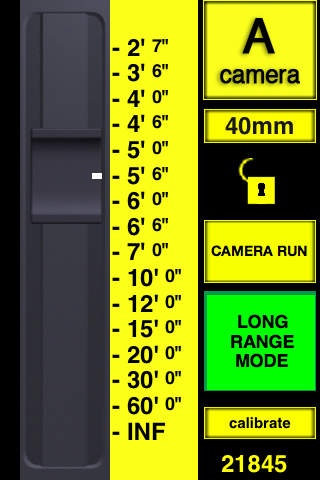
Real-Time wireless control of professional cameras for the movie industry.
Product demonstration video at
http://www.youtube.com/watch?v=g9M3sSsmH4w
Wireless iRis allows Directors of Photography, camera assistants, or Digital Technicians the freedom of being able to move around the film set without being required to carry additional hardware to wirelessly control the exposure or zoom of each camera.
The Wireless iRis app was written specifically to be used with the new fStop Wireless single channel Lens Motor Driver from www.plcelectronicsolutions.com.
Use of the touch screen is quite responsive and has no noticeable latency.
The lens markings line up precisely with the ruler and can be calibrated for any of the 16 user programmable lenses.
By the use of hand gestures the ruler can also be expanded for increased resolution thereby setting the limits of the lens motor travel.
Our Lock feature prevents unintended changes and our connection status indicator assures us that the receiver is indeed connected and moving the motor to the desired position.
When multiple cameras have fStop boxes connected to them you can easily switch control between them as well as view the current stop of each camera simulaneously simply by rotating the screen to a landscape view, all from a single handheld device.
Requires iOS 3.0 or later. Compatible with iPhone, iPad, and iPod touch.
About Wireless iRis
The company that develops Wireless iRis is PLC Electronic Solutions Ltd. The latest version released by its developer is 2.0.
To install Wireless iRis on your iOS device, just click the green Continue To App button above to start the installation process. The app is listed on our website since 2009-12-12 and was downloaded 0 times. We have already checked if the download link is safe, however for your own protection we recommend that you scan the downloaded app with your antivirus. Your antivirus may detect the Wireless iRis as malware if the download link is broken.
How to install Wireless iRis on your iOS device:
- Click on the Continue To App button on our website. This will redirect you to the App Store.
- Once the Wireless iRis is shown in the iTunes listing of your iOS device, you can start its download and installation. Tap on the GET button to the right of the app to start downloading it.
- If you are not logged-in the iOS appstore app, you'll be prompted for your your Apple ID and/or password.
- After Wireless iRis is downloaded, you'll see an INSTALL button to the right. Tap on it to start the actual installation of the iOS app.
- Once installation is finished you can tap on the OPEN button to start it. Its icon will also be added to your device home screen.
Program Details
System requirements
Download information
Pricing
Version History
version 2.0
posted on 2009-12-12
Disclaimer
Official App Store Link
We do not host Wireless iRis on our servers. We did not scan it for viruses, adware, spyware or other type of malware. This app is hosted by Apple and passed their terms and conditions to be listed there. We recommend caution when installing it.
The App Store link for Wireless iRis is provided to you by apps112.com without any warranties, representations or guarantees of any kind, so access it at your own risk.
If you have questions regarding this particular app contact the publisher directly. For questions about the functionalities of apps112.com contact us.
